Why Physical Recording Controls Can Beat Voice Commands
Voice commands have become one of the most recognizable features of modern smart glasses.
Being able to tell your glasses to take a picture, start recording or perform another function can feel futuristic. For many situations, voice control is genuinely useful.
But when your primary goal is recording video, voice commands aren’t always the best way to control a camera.
Sometimes, a simple physical button can be faster, more reliable and more convenient.
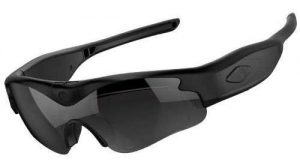
That’s one reason dedicated camera sunglasses can appeal to people who want straightforward hands-free POV video without relying on voice interaction for every recording.
Click here for the official daVideo Camera Sunglasses
Voice Commands Are Convenient — But They Aren’t Perfect
There’s no question that voice control can be useful.
Imagine you’re walking down a trail and want to take a picture without reaching for your phone. Saying a command can be extremely convenient.
The same applies to many everyday situations.
But recording video introduces some additional challenges.
Your surroundings may be:
- Loud
- Windy
- Crowded
- Quiet when you don’t want to speak
- Full of other people talking
- Difficult for microphones to interpret
You may also simply not want to talk to your glasses.
That’s where a physical recording button can have a major advantage.
1. A Physical Button Gives You Immediate Feedback
One of the biggest benefits of a physical recording control is that you can feel it.
You don’t have to wonder whether your voice command was understood.
You don’t have to wait for the glasses to interpret what you said.
You simply press the recording button.
Depending on the camera design, an indicator light or other feedback can also confirm that recording has started.
That creates a very simple interaction:
Press → confirm → record.
For a dedicated camera, that simplicity can be extremely valuable.
2. Physical Controls Work in Noisy Environments
Voice commands can become less convenient when you’re somewhere loud.
Consider recording while:
- Riding a motorcycle
- Cycling
- Skiing
- At a concert
- At a sporting event
- Working around machinery
- Using power tools
- At a busy construction site
- Near traffic
- Around other people
In these environments, speaking a command isn’t necessarily ideal.
Wind noise can also make voice interaction more challenging.
If you’re riding a motorcycle with significant wind noise, for example, you may not want to depend on a microphone correctly interpreting a command.
A physical button doesn’t care how loud the environment is.
If you can reach the button, you can activate the camera.
3. You Don’t Have to Talk to Your Camera
There’s another advantage that’s easy to overlook.
Sometimes you simply don’t want to talk.
Imagine you’re filming wildlife.
You spot a deer several yards away.
You don’t want to say:
“Start recording.”
You don’t want to make noise that could attract attention.
A physical control allows you to quietly start recording.
The same applies to:
- Bird watching
- Fishing
- Hunting
- Nature photography
- Museums
- Libraries
- Weddings
- Performances
- Quiet work environments
A physical recording button can let you operate the camera discreetly without speaking.
4. Physical Controls Can Be Better for Action
Action activities are another situation where physical controls can be particularly useful.
Imagine you’re mountain biking.
You’re moving quickly, concentrating on the trail and trying to avoid obstacles.
You don’t necessarily want to rely on a voice command.
You want the camera ready before you start.
A physical control gives you the ability to start recording with a simple action.
The same principle applies to:
- Skateboarding
- Snowboarding
- Skiing
- BMX
- Mountain biking
- Kayaking
- Motorcycling
- Fishing
- Off-road driving
When you’re actively moving, simplicity matters.
5. Voice Commands Can Be Misunderstood
Voice recognition has improved dramatically, but no voice-recognition system is perfect.
There can be situations where:
- Your words aren’t recognized
- Background noise interferes
- Wind affects the microphone
- Someone else is speaking
- The device interprets something incorrectly
- You aren’t facing the microphone
- The command isn’t phrased the way the device expects
That doesn’t necessarily make voice control bad.
It simply means that voice control introduces another step between you and the camera.
A physical button eliminates that step.
You don’t need the camera to understand you.
You control the camera directly.
6. Physical Controls Don’t Require the Right Words
A voice-controlled camera generally requires you to use an appropriate command.
A physical button doesn’t care what language you speak, how you pronounce something or whether the microphone understands you.
You simply press it.
This can be especially helpful when you’re traveling internationally or recording in situations where speaking isn’t practical.
The camera doesn’t need to interpret anything.
7. Physical Controls Are Useful When You Can’t Use Your Phone
One of the reasons people buy camera glasses in the first place is to avoid constantly reaching for their phone.
You may have your phone in your pocket, backpack or vehicle.
But even if your phone is nearby, pulling it out can interrupt what you’re doing.
A physical control on your glasses keeps the recording process close to the camera.
You can start recording without:
- Pulling out your phone
- Unlocking your phone
- Opening a camera app
- Finding the record button
- Holding a smartphone
- Changing your position
That’s the whole appeal of wearable cameras.
The camera is already with you.
8. Physical Controls Can Be Easier to Learn
A good physical button is intuitive.
Press it.
Record.
Press it again.
Stop.
There’s not much to learn.
This can be particularly appealing for people who don’t want to spend time learning a complicated smart-glasses interface.
Dedicated camera sunglasses can provide a more traditional camera-like experience in a wearable format.
If you’ve used a camera before, the concept is familiar.
9. Physical Controls Can Reduce Unnecessary Technology
This is one of the biggest philosophical differences between dedicated camera glasses and smart glasses.
Smart glasses are designed to provide a wide range of technology.
That can include:
- Voice assistants
- Audio
- Phone calls
- AI features
- Smartphone connectivity
- Notifications
- Camera functions
- Other connected features
That’s great if you want all of those capabilities.
But some people don’t.
Some users simply want a camera.
They don’t need their glasses to understand their voice.
They don’t need an AI assistant.
They don’t need their glasses to perform multiple smart functions.
They want to record video.
For those users, a physical recording control can actually be an advantage rather than a limitation.
10. Physical Controls Can Be Better When You Need Precision
Imagine you’re setting up a shot.
You have your camera glasses positioned correctly.
You’re waiting for something to happen.
You don’t want to start recording too early.
You also don’t want to miss the moment.
A physical button lets you activate the camera exactly when you’re ready.
This can be useful for:
- Sports
- Wildlife
- Events
- Automotive projects
- DIY projects
- Demonstrations
- Product testing
- Outdoor adventures
The fewer steps between seeing something and recording it, the better.
11. You Can Prepare Before the Action Starts
One of the best strategies for wearable camera recording is to prepare before the important moment.
For example, if you’re about to ride a mountain bike trail, you can start recording before you begin.
If you’re going fishing, you can activate the camera before casting.
If you’re about to demonstrate a repair, you can start recording before picking up the tool.
This is where physical controls are particularly useful.
You don’t need to interrupt what you’re doing to give a command.
You simply activate the camera and continue.
12. Voice Control Is Still Useful
It’s important not to take this comparison too far.
Voice commands are not bad.
In fact, they can be excellent in the right situation.
Voice control is particularly convenient when:
- Your hands are occupied
- You don’t want to touch the device
- You’re casually taking photos
- You’re using other smart features
- You’re already interacting with the glasses
- You want a completely hands-free command
For smart glasses, voice interaction can be one of the most useful features.
The point isn’t that physical controls are always better.
The point is that physical controls can be better for certain recording situations.
Physical Controls vs. Voice Commands
Here’s a simple comparison:
| Recording Situation | Physical Control | Voice Command |
|---|---|---|
| Quiet environment | Excellent | Excellent |
| Loud environment | Excellent | Can be challenging |
| Strong wind | Excellent | Can be challenging |
| Motorcycle riding | Excellent | Less convenient |
| Wildlife recording | Excellent | Less discreet |
| Crowded event | Excellent | Can be inconvenient |
| Hands occupied | Good | Excellent |
| Don’t want to speak | Excellent | Poor fit |
| Need immediate activation | Excellent | Depends on recognition |
| Simple operation | Excellent | Requires command |
| Smart-glasses functions | Limited to available controls | Excellent |
| Recording-focused use | Excellent | Useful |
The winner depends on the situation.
But for someone who primarily thinks of their glasses as a wearable video camera, physical controls can offer a major practical advantage.
Why This Matters for POV Video
POV video is all about capturing what you’re actually experiencing.
You don’t want to miss the moment because you’re trying to interact with technology.
If you see something worth recording, the ideal experience is simple:
Activate the camera and keep doing what you’re doing.
That’s one reason dedicated camera glasses can be so appealing.
The camera doesn’t have to be an AI assistant.
It doesn’t have to be a smart-home controller.
It doesn’t have to be a phone replacement.
It can simply be a camera that happens to be attached to your glasses.
Physical Controls Can Be More Predictable
There’s something reassuring about a physical control.
You know exactly where it is.
You know what it does.
And you don’t have to wonder whether the device heard you.
This predictability becomes more valuable as the situation becomes more demanding.
If you’re recording a special event, performing a difficult task or capturing something that may only happen once, you don’t want to spend several seconds wondering whether your command worked.
A physical button gives you a direct connection to the camera.
Physical Controls and Privacy
There can also be a privacy benefit to not having to speak commands.
You don’t have to verbally announce what you’re doing.
That can be preferable in public spaces.
For example, you might want to photograph or record something without speaking aloud to your glasses.
A physical control allows you to operate the camera silently.
Of course, responsible camera use still matters. Always respect applicable laws, venue rules and the privacy of other people when recording.
Why Simplicity Can Be a Feature
Technology companies often compete by adding more features.
More AI.
More connectivity.
More automation.
More voice controls.
More apps.
But more features don’t necessarily make a device better for every user.
Sometimes the best feature is simplicity.
If you’re buying camera sunglasses because you want to record video, you may appreciate a product that doesn’t make the recording process unnecessarily complicated.
A physical button is about as simple as camera control gets.
daVideo Camera Sunglasses vs. Meta
This is another area where the difference between dedicated camera sunglasses and smart glasses becomes apparent.
Meta glasses offer an impressive combination of camera, audio and smart features, including voice interaction.
That makes them attractive to people who want a multifunctional wearable.
But if you’re primarily looking for straightforward camera control, you may prefer a more traditional physical recording interface.
The important question isn’t:
“Which glasses have more technology?”
It’s:
“Which glasses make it easiest for me to record the way I want to record?”
For some people, that’s voice control.
For others, it’s a physical button.
When Physical Recording Controls Are the Better Choice
Physical controls can be particularly valuable if you:
- Ride motorcycles
- Ride bicycles
- Go hiking
- Fish
- Record wildlife
- Work with power tools
- Work in construction
- Build or repair vehicles
- Record sporting activities
- Attend concerts
- Record outdoor adventures
- Don’t want to speak commands
- Frequently record in noisy environments
- Prefer simple camera controls
In these situations, a physical recording button can be more practical than voice control.
When Voice Commands May Be Better
Voice commands can be the better option when:
- Your hands are completely occupied
- You’re already using other smart features
- You want to take a quick picture
- You don’t want to touch the glasses
- You’re in a quiet environment
- You want broader smart-glasses functionality
There’s nothing wrong with using voice commands.
They’re simply another tool.
The important thing is having the control method that works best for your activity.
The Best Camera Control Is the One You Can Trust
When you’re recording something important, reliability matters.
You don’t want to finish a long hike and discover you never started recording.
You don’t want to get home from an event and realize the camera didn’t understand your command.
You don’t want to miss an important moment because you were trying to get your wearable technology to cooperate.
A physical control provides a straightforward alternative.
Press the button. Check the indicator. Start recording.
It’s simple.
And sometimes simple is exactly what you want.
Final Thoughts
Voice commands are one of the coolest developments in modern wearable technology.
But they aren’t automatically the best way to control a camera.
For recording-focused users, physical recording controls can offer speed, reliability and simplicity that voice commands can’t always match.
They’re especially useful in noisy environments, windy conditions, action sports, outdoor adventures and situations where you simply don’t want to talk to your glasses.
That’s one of the advantages of dedicated camera sunglasses.
Instead of focusing on how many smart features a device has, you can focus on the features that actually matter when you’re trying to record.
A great wearable camera doesn’t necessarily need to understand everything you say.
Sometimes you just need to press a button and capture the moment.
Frequently Asked Questions
Are physical buttons better than voice commands on camera glasses?
Not always. Physical buttons can be more reliable in noisy or windy environments and are useful when you don’t want to speak. Voice commands can be more convenient when your hands are occupied or when you’re using other smart-glasses features.
Why are physical recording controls useful for POV video?
They allow you to start or stop recording without relying on voice recognition. This can be particularly useful when you’re moving, outdoors or recording in a noisy environment.
Can voice commands fail while recording?
Voice recognition can occasionally be affected by background noise, wind, other conversations or the way a command is spoken. A physical control eliminates the need for the camera to interpret a verbal command.
Are physical camera controls more private?
They can be more discreet because you don’t have to verbally announce a command. However, you should always respect other people’s privacy and applicable recording laws.
Are daVideo camera sunglasses better than Meta glasses?
It depends on what you want. Meta glasses are designed as multifunctional smart glasses with camera, audio and smart features. Dedicated daVideo camera sunglasses can be a better fit for users who primarily want straightforward hands-free video recording.
Do camera sunglasses need voice commands?
No. Camera glasses can use physical controls to operate recording. This can be preferable for users who want a simple camera-focused experience.
Click here for the official daVideo Camera Sunglasses


Why Physical Recording Controls Can Beat Voice Commands
Why Physical Recording Controls Can Beat Voice Commands Voice commands have become one of the most recognizable features of modern smart glasses. Being able to tell your glasses to take a picture, start recording or perform another function can feel futuristic. For many situations, voice control is genuinely useful. But when your primary goal is recording video, voice commands aren’t always the best way to control a camera. Sometimes, a simple physical […]
The Best Camera Glasses for Motorcycle Riders: What Should You Look For?
The Best Camera Glasses for Motorcycle Riders: What Should You Look For? Motorcycle riding is one of those activities that is incredibly difficult to capture from your own perspective. You can mount a camera to your motorcycle. You can attach an action camera to your helmet. You can have another rider follow you with a camera. But there is something different about recording exactly what you see while you’re riding. That’s where […]
Why Adjustable Camera Angles Matter in POV Camera Glasses
Why Adjustable Camera Angles Matter in POV Camera Glasses When people shop for POV camera glasses, they often focus on resolution. 1080p. 4K. Frame rate. Megapixels. Storage. Battery life. All of those specifications matter. But there’s another feature that can have a surprisingly big impact on your finished video: The angle of the camera. A camera can have excellent resolution, but if it’s pointed too high, too low or in the wrong […]
Why 128GB of Removable Storage Matters in Video Camera Sunglasses
Why 128GB of Removable Storage Matters in Video Camera Sunglasses When shopping for video camera sunglasses, it’s easy to focus on camera resolution. 1080p. 4K. Frame rates. Wide-angle lenses. Image stabilization. But there’s another specification that can be just as important: Storage. After all, what good is a camera that records great video if you quickly run out of space? For people who plan to record a lot of POV video, travel […]
Camera Glasses Without the AI: Why Simpler Can Be Better
Camera Glasses Without the AI: Why Simpler Can Be Better Smart glasses have become increasingly sophisticated. Some can answer questions, interact with your phone, provide voice assistance, take photos, record video, play audio, make calls and offer AI-powered features. That’s impressive technology. But there’s another question worth asking: Do you actually need all of those features if your main goal is recording video? For many people, the answer may be no. If […]
Why Pay for AI Features When You Just Want to Record Video?
Why Pay for AI Features When You Just Want to Record Video? AI is everywhere. It’s in smartphones, computers, cars, cameras, apps, search engines — and now, it’s becoming a major selling point for smart glasses. Modern smart glasses can offer impressive technology. Depending on the product, they may provide AI assistants, voice commands, object recognition, translations, questions and answers, smartphone integration, and other connected features. But there’s an important question consumers […]
daVideo vs. Meta Glasses: Which Is Better for Recording POV Video?
daVideo vs. Meta Glasses: Which Is Better for Recording POV Video? Point-of-view video has become one of the most engaging ways to record and share experiences. Instead of watching someone hold a camera from the outside, POV video puts the viewer directly into the action. Whether you’re traveling, walking through a new city, working on a project, attending an event, riding a bike, exploring outdoors, or creating social-media content, POV footage gives […]
110° Wide-Angle POV Video: Why Lens Coverage Matters
110° Wide-Angle POV Video: Why Lens Coverage Matters When you’re recording video from your own point of view, lens coverage matters just as much as video resolution. A camera mounted on your face doesn’t always point exactly where a traditional handheld camera would. Your head moves, your eyes move, and your body naturally changes position while you’re walking, working, traveling, or interacting with your surroundings. That’s why a 110° wide-angle POV camera […]
5 Reasons Dedicated Video Camera Sunglasses Beat Smart Glasses for Recording
5 Reasons Dedicated Video Camera Sunglasses Beat Smart Glasses for Recording Smart glasses have become one of the most talked-about wearable technologies. They can connect to your phone, play music, answer calls, provide voice assistance, and in some cases record photos and video. But if your main reason for buying glasses is recording video, do you really need a pair of smart glasses loaded with features you may never use? For many […]
Looking for a Meta Glasses Alternative? Consider Dedicated Camera Sunglasses
Looking for a Meta Glasses Alternative? Consider Dedicated Camera Sunglasses If you’ve been searching for Meta glasses alternatives, you may have noticed that many of today’s smart glasses are designed to do far more than simply record video. Modern Meta glasses combine cameras with features such as audio, microphones, AI, smartphone connectivity and other smart functions. For some people, that’s exactly what they want. But what if you don’t need all of […]
Why daVideo Camera Sunglasses Are Built for People Who Actually Want to Record
Why daVideo Camera Sunglasses Are Built for People Who Actually Want to Record There are plenty of smart glasses on the market today. Some can play music. Some can make phone calls. Some connect to your smartphone. Some offer AI assistants and other smart features. And many can record video. But there’s a big difference between glasses that happen to have a camera and camera sunglasses designed for people who actually want […]
Why You Don’t Need AI to Record Amazing POV Video
Why You Don’t Need AI to Record Amazing POV Video Artificial intelligence is everywhere. It’s built into smartphones, computers, cameras, search engines and increasingly into eyewear. Today’s smart glasses can do some impressive things. Depending on the model, they can answer questions, interact with AI assistants, play audio, make calls, connect to your smartphone and record photos and video. But here’s something worth remembering: You don’t need artificial intelligence to record great […]
Leave A Comment