Why Vibration Recording Alerts Matter When You’re Wearing Camera Glasses
When you’re using a traditional camera, it’s usually easy to see what’s happening.
You can look at the screen.
You can see the recording indicator.
You can hear a confirmation sound.
But camera glasses are different.
When you’re wearing a camera on your face, you can’t necessarily see the camera itself while you’re using it. You may not have a screen directly in front of you. You may also be outdoors, in a noisy environment or moving around while recording.
That’s why vibration recording alerts can be such a useful feature in camera glasses.
A small vibration can provide an important confirmation without requiring you to look at the camera, listen for a sound or pull out your phone.
For people using camera glasses for POV video, outdoor adventures, motorcycle rides, work projects and hands-free recording, that simple feedback can make a big difference.
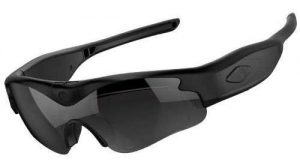
Click here for the official daVideo Camera Sunglasses
What Is a Vibration Recording Alert?
A vibration recording alert is a physical notification from the camera glasses.
When you press the recording control, the glasses can provide a short vibration to let you know that an action has occurred.
Depending on the specific camera design, vibration feedback may be used to indicate things such as:
- Recording started
- Recording stopped
- Another camera function was activated
- A command or button press was recognized
The exact behavior depends on the specific model.
The important idea is simple:
You can feel what the camera is doing.
You don’t necessarily need to see it.
Why Feedback Matters on Camera Glasses
Traditional cameras usually give you visual feedback.
You can look at the LCD screen and immediately see whether you’re recording.
Camera glasses don’t always provide that luxury.
Once they’re on your face, the camera may be outside your normal field of vision.
You might press the recording button and wonder:
Did it actually start?
That uncertainty can be frustrating.
A vibration provides a direct physical confirmation.
Instead of guessing, you can feel that the camera responded.
1. You Don’t Have to Take Off the Glasses
One of the biggest advantages of camera glasses is convenience.
You put them on and start recording.
You don’t want to remove them every time you need to check whether recording has started.
A vibration alert lets you remain focused on what you’re doing.
For example, imagine you’re getting ready to ride a bicycle.
You put on your camera glasses, press the recording button and feel the confirmation.
Now you can start riding.
There’s no need to:
- Take the glasses off
- Look for a screen
- Check your phone
- Reach for another camera
- Guess whether recording started
That’s exactly the kind of small convenience that makes wearable technology more practical.
2. Vibration Alerts Are Useful for POV Video
POV recording is all about capturing what you’re seeing.
The whole point of camera glasses is to keep your hands and attention available for the activity.
A recording alert that you can feel fits perfectly with that concept.
You don’t have to look away from what you’re doing.
You don’t have to turn your head toward a screen.
You simply receive physical feedback from the glasses.
For first-person video, that’s a major advantage.
3. You Can Confirm Recording Without Looking
Imagine you’re hiking down a trail.
You see something interesting and want to start recording.
You press the button.
If the glasses provide vibration feedback, you can feel the confirmation.
You don’t need to stop walking and inspect the camera.
This can be useful for:
- Hiking
- Fishing
- Cycling
- Kayaking
- Skiing
- Snowboarding
- Motorcycle riding
- Camping
- Wildlife observation
The less you have to interact with the device, the more natural the recording experience becomes.
4. Vibration Can Be Better Than an Audio Alert
A camera could theoretically make a sound when recording starts.
But audio alerts aren’t always ideal.
Imagine you’re:
- At a concert
- Riding a motorcycle
- Near construction equipment
- At a sporting event
- Around power tools
- In heavy traffic
- In a crowded area
You might not hear the camera at all.
Background noise can easily overwhelm a small electronic confirmation sound.
A vibration doesn’t have that problem.
You feel it instead of hearing it.
That’s one reason tactile feedback is particularly useful for wearable devices.
5. Vibration Alerts Work in Noisy Environments
This is especially important for people who use camera glasses outdoors.
Wind noise can be significant when you’re moving.
If you’re riding a motorcycle or bicycle, the environment can be extremely loud.
If you’re skiing or snowboarding, wind can make audio confirmation difficult.
At a concert or sporting event, there may be thousands of people creating noise around you.
A vibration alert remains useful because it doesn’t depend on your surroundings being quiet.
6. Vibration Alerts Can Reduce Recording Mistakes
One of the biggest problems with any camera is thinking you’re recording when you’re actually not.
You might press a button but fail to activate the camera.
Or you might accidentally stop recording.
If the device provides tactile feedback, you have another way to confirm what’s happening.
That can reduce uncertainty.
For example:
Press → vibration → recording begins.
Later:
Press → vibration → recording stops.
That immediate feedback can help you develop confidence in the camera’s operation.
7. It Helps When You’re Wearing Gloves
This is a particularly interesting use case for outdoor users.
Suppose you’re skiing, snowboarding, riding a motorcycle or working outdoors during winter.
You’re wearing gloves.
Touchscreens can become inconvenient.
Small controls can also be difficult to operate.
A physical button combined with vibration feedback can make the interaction much easier.
You press the button.
You feel the response.
You don’t need to see a tiny indicator.
For cold-weather activities, that can be a surprisingly useful feature.
8. Vibration Feedback Is Great for Motorcycle Riders
Motorcycle riders are a perfect example of why tactile feedback can matter.
When you’re riding, you have:
- Wind noise
- Engine noise
- Road noise
- Traffic
- Helmet noise
You also need to concentrate on riding.
You don’t want to stare at a device.
You don’t want to rely entirely on hearing a tiny confirmation sound.
A physical recording control combined with vibration feedback gives you a simple way to know that the camera responded.
That’s exactly the type of interaction that makes sense for wearable POV cameras.
9. It Can Help During Hands-Free Work
Camera glasses aren’t only for recreation.
They can also be useful for documenting work.
Consider:
- Auto repair
- Welding
- Metal fabrication
- Construction
- Woodworking
- Equipment repair
- DIY projects
- Product demonstrations
- Mechanical work
When you’re working with both hands, you don’t want to stop constantly to check a camera.
You can activate recording and continue working.
If the glasses provide vibration feedback, you have confirmation without interrupting the job.
10. You Don’t Always Want Your Phone Involved
Smartphones are incredibly useful.
But sometimes the entire reason for wearing camera glasses is to avoid using your phone.
You don’t want to:
- Pull your phone out.
- Unlock it.
- Open the camera app.
- Check the connection.
- Start recording.
- Put the phone away.
That’s too much interaction when you’re trying to capture a quick moment.
A physical recording button and vibration feedback can create a much simpler workflow.
Press the glasses. Feel the confirmation. Keep going.
11. Vibration Alerts Make Wearable Cameras Feel More Natural
There’s something important about tactile feedback.
It’s immediate.
You don’t have to consciously interpret a message.
You simply feel the device respond.
That’s particularly appropriate for something you’re wearing on your face.
Instead of constantly checking the device, the device can communicate with you through a physical sensation.
This is one reason vibration feedback has become common in:
- Smartwatches
- Fitness trackers
- Smartphones
- Game controllers
- GPS devices
- Wearable technology
Camera glasses can benefit from the same concept.
12. Physical Feedback Is Useful When You’re Focused on the Activity
When you’re recording, your attention should generally be on the experience you’re capturing.
If you’re mountain biking, watch the trail.
If you’re fishing, watch the water.
If you’re skiing, watch the slope.
If you’re working on a vehicle, focus on the repair.
You don’t want your recording device constantly demanding your attention.
Vibration feedback is subtle enough to communicate important information without requiring you to stop what you’re doing.
13. Vibration Can Complement Physical Recording Controls
This is where the combination becomes especially useful.
A physical button by itself gives you control.
A vibration alert gives you confirmation.
Together, they create a very simple interface:
Step 1: Press the physical button.
Step 2: Feel the vibration.
Step 3: Continue your activity.
You don’t need to see a screen.
You don’t need to issue a voice command.
You don’t need to wait for an audio announcement.
This is one of the simplest ways to operate a wearable camera.
Vibration vs. Voice vs. Visual Feedback
Different forms of feedback have different advantages.
| Feedback Type | Main Advantage | Potential Limitation |
|---|---|---|
| Vibration | Can be felt without looking or listening | Must be noticeable enough |
| Voice/audio | Can communicate information verbally | Difficult to hear in noisy environments |
| Visual indicator | Easy to understand when visible | Camera may be out of your line of sight |
| Smartphone notification | Can provide detailed information | Requires looking at your phone |
| Physical button | Direct control | Requires physical access |
For camera glasses, vibration is particularly interesting because it works naturally with a device that you are already wearing.
Why Vibration Is Especially Useful Without a Display
Many traditional cameras have displays.
You can see:
REC
or a red recording indicator.
Camera glasses may not have a conventional display available to the wearer.
That means physical feedback becomes more important.
A camera without a display needs another way to communicate what’s happening.
Vibration is one solution.
It allows the glasses to communicate without adding a screen to the device.
That can help keep the glasses lighter, simpler and more wearable.
Vibration Feedback and Battery Life
Like any electronic feature, vibration uses some power.
However, recording feedback typically involves brief vibrations rather than continuous operation.
That makes it a relatively simple way to communicate information compared with adding a full display or other hardware.
The overall effect on battery life depends on the camera’s design and how frequently the feedback is used.
As with any camera glasses feature, actual battery performance depends on the specific model.
Vibration Alerts Can Be More Discreet
There are situations where you don’t want everyone around you to know you’re interacting with your camera.
An audio confirmation can be noticeable.
A vibration is much more private.
Only you feel it.
That can be useful at:
- Museums
- Events
- Travel destinations
- Quiet outdoor locations
- Meetings where recording is permitted
- Demonstrations
- Other quiet environments
Of course, whether recording is appropriate depends on the location, applicable laws and the privacy expectations of others.
Why This Feature Matters When Comparing Camera Glasses
When shoppers compare camera glasses, they often focus on major specifications:
- Resolution
- Frame rate
- Field of view
- Storage
- Battery
- Stabilization
Those are important.
But smaller usability features can have a major effect on the actual recording experience.
A vibration recording alert is a perfect example.
It isn’t necessarily the feature that gets the biggest headline.
But when you’re actually wearing the glasses, it can be incredibly useful.
daVideo Camera Sunglasses and Simple Recording
This is another reason dedicated camera sunglasses can appeal to people who want a straightforward recording experience.
You don’t necessarily need complicated interaction to record good POV video.
You need a camera that lets you:
- Start recording
- Know that recording started
- Stop recording
- Know that recording stopped
- Keep your attention on what you’re doing
Physical controls and tactile feedback can help accomplish exactly that.
Instead of adding more technology, the goal is to make the technology easier to use.
The Best Wearable Technology Doesn’t Always Get in Your Way
That’s ultimately the biggest advantage of a feature like vibration feedback.
It doesn’t demand much attention.
You don’t need to stop what you’re doing.
You don’t need to stare at a screen.
You don’t need to speak.
You simply feel a quick confirmation and continue.
That’s exactly what you want from wearable technology.
The camera should help you capture the experience without becoming the experience.
Who Should Look for Vibration Recording Alerts?
Vibration feedback can be particularly useful for:
Outdoor enthusiasts
Hikers, campers, fishermen and cyclists can confirm recording without stopping.
Motorcycle riders
Wind and engine noise make audible feedback less practical.
Action sports users
Skiers, snowboarders, mountain bikers and skateboarders can benefit from simple tactile confirmation.
Workers
Hands-free recording can document projects without requiring frequent interaction.
Content creators
Quick confirmation can reduce the chance of missing important footage.
Travelers
You can operate the camera without constantly pulling out your phone.
Anyone who prefers simplicity
Some people simply prefer physical controls and tactile feedback over voice commands.
What to Look for in Camera Glasses
If vibration feedback is important to you, don’t just look for the words “vibration” or “haptic.”
Look at how the feature actually works.
Consider:
- Does the glasses vibrate when recording starts?
- Does it vibrate when recording stops?
- Is the vibration strong enough to notice?
- Can you distinguish different notifications?
- Is there also a visual recording indicator?
- Does the camera use a physical recording button?
- How easy is the button to reach?
- Can you operate it while wearing gloves?
- Does the feedback work without using a smartphone?
The exact implementation varies between models.
Final Thoughts
Vibration recording alerts might seem like a small feature.
But when you’re wearing a camera on your face, small usability features can make a big difference.
You can’t always see the camera.
You may not be able to hear it.
You may not want to speak to it.
And you don’t want to pull out your phone every time you start recording.
A vibration gives you something simple and valuable:
confirmation you can feel.
For hikers, cyclists, motorcycle riders, fishermen, travelers, workers, content creators and anyone using camera glasses for hands-free POV video, tactile recording feedback can make the entire experience more reliable and less distracting.
That’s the beauty of good wearable technology.
It doesn’t have to constantly demand your attention.
Sometimes the best feature is simply a quick vibration that tells you:
You’re recording.
Frequently Asked Questions
What is a vibration recording alert?
A vibration recording alert is tactile feedback from camera glasses that can indicate when recording or another camera function has been activated. The exact behavior depends on the specific model.
Why is vibration useful on camera glasses?
Because you may not be able to see the camera while wearing the glasses. Vibration lets you confirm that an action occurred without looking at a screen or relying on an audio notification.
Is vibration better than a voice command?
It depends on the situation. Vibration can be more convenient in noisy environments and when you don’t want to speak. Voice commands can be useful when your hands are occupied or when you want additional smart-glasses functionality.
Is vibration useful for motorcycle camera glasses?
Yes. Motorcycle riders deal with wind, engine and road noise, making audible confirmation difficult. Tactile feedback can provide confirmation without requiring the rider to hear an alert.
Are vibration alerts useful for hiking and outdoor activities?
Yes. They allow you to confirm recording without stopping, looking at a phone or removing the camera glasses.
Do all camera glasses have vibration alerts?
No. Features vary by model. If tactile recording feedback is important to you, check the specifications of the exact camera glasses you’re considering.
Are physical controls and vibration feedback a good combination?
Yes. A physical button provides direct control, while vibration provides confirmation. Together, they can create a simple recording experience without requiring a screen or voice command.
Click here for the official daVideo Camera Sunglasses


Why Vibration Recording Alerts Matter When You’re Wearing Camera Glasses
Why Vibration Recording Alerts Matter When You’re Wearing Camera Glasses When you’re using a traditional camera, it’s usually easy to see what’s happening. You can look at the screen. You can see the recording indicator. You can hear a confirmation sound. But camera glasses are different. When you’re wearing a camera on your face, you can’t necessarily see the camera itself while you’re using it. You may not have a screen directly […]
daVideo vs. Meta Glasses: 15 Reasons to Consider Dedicated Video Camera Sunglasses
daVideo vs. Meta Glasses: 15 Reasons to Consider Dedicated Video Camera Sunglasses If you’re shopping for camera glasses, you’ve probably come across Meta glasses. They’re one of the best-known smart-glasses products on the market, combining a camera with features such as audio, smartphone connectivity, voice interaction, and other smart capabilities. But there’s another category worth considering: dedicated video camera sunglasses. Instead of trying to turn glasses into an all-purpose smart device, dedicated […]
Why Dedicated Camera Glasses Make Sense for Action Sports
Why Dedicated Camera Glasses Make Sense for Action Sports Action sports are all about movement. Whether you’re riding a mountain bike, skiing down a slope, skateboarding, snowboarding, kayaking, fishing, hiking, motocross riding or simply trying something new, the experience happens quickly. That creates a challenge for anyone who wants to record it. You can’t always hold a camera. You don’t always have time to set up a tripod. And you don’t necessarily […]
Why Physical Recording Controls Can Beat Voice Commands
Why Physical Recording Controls Can Beat Voice Commands Voice commands have become one of the most recognizable features of modern smart glasses. Being able to tell your glasses to take a picture, start recording or perform another function can feel futuristic. For many situations, voice control is genuinely useful. But when your primary goal is recording video, voice commands aren’t always the best way to control a camera. Sometimes, a simple physical […]
The Best Camera Glasses for Motorcycle Riders: What Should You Look For?
The Best Camera Glasses for Motorcycle Riders: What Should You Look For? Motorcycle riding is one of those activities that is incredibly difficult to capture from your own perspective. You can mount a camera to your motorcycle. You can attach an action camera to your helmet. You can have another rider follow you with a camera. But there is something different about recording exactly what you see while you’re riding. That’s where […]
Why Adjustable Camera Angles Matter in POV Camera Glasses
Why Adjustable Camera Angles Matter in POV Camera Glasses When people shop for POV camera glasses, they often focus on resolution. 1080p. 4K. Frame rate. Megapixels. Storage. Battery life. All of those specifications matter. But there’s another feature that can have a surprisingly big impact on your finished video: The angle of the camera. A camera can have excellent resolution, but if it’s pointed too high, too low or in the wrong […]
Why 128GB of Removable Storage Matters in Video Camera Sunglasses
Why 128GB of Removable Storage Matters in Video Camera Sunglasses When shopping for video camera sunglasses, it’s easy to focus on camera resolution. 1080p. 4K. Frame rates. Wide-angle lenses. Image stabilization. But there’s another specification that can be just as important: Storage. After all, what good is a camera that records great video if you quickly run out of space? For people who plan to record a lot of POV video, travel […]
Camera Glasses Without the AI: Why Simpler Can Be Better
Camera Glasses Without the AI: Why Simpler Can Be Better Smart glasses have become increasingly sophisticated. Some can answer questions, interact with your phone, provide voice assistance, take photos, record video, play audio, make calls and offer AI-powered features. That’s impressive technology. But there’s another question worth asking: Do you actually need all of those features if your main goal is recording video? For many people, the answer may be no. If […]
Why Pay for AI Features When You Just Want to Record Video?
Why Pay for AI Features When You Just Want to Record Video? AI is everywhere. It’s in smartphones, computers, cars, cameras, apps, search engines — and now, it’s becoming a major selling point for smart glasses. Modern smart glasses can offer impressive technology. Depending on the product, they may provide AI assistants, voice commands, object recognition, translations, questions and answers, smartphone integration, and other connected features. But there’s an important question consumers […]
daVideo vs. Meta Glasses: Which Is Better for Recording POV Video?
daVideo vs. Meta Glasses: Which Is Better for Recording POV Video? Point-of-view video has become one of the most engaging ways to record and share experiences. Instead of watching someone hold a camera from the outside, POV video puts the viewer directly into the action. Whether you’re traveling, walking through a new city, working on a project, attending an event, riding a bike, exploring outdoors, or creating social-media content, POV footage gives […]
110° Wide-Angle POV Video: Why Lens Coverage Matters
110° Wide-Angle POV Video: Why Lens Coverage Matters When you’re recording video from your own point of view, lens coverage matters just as much as video resolution. A camera mounted on your face doesn’t always point exactly where a traditional handheld camera would. Your head moves, your eyes move, and your body naturally changes position while you’re walking, working, traveling, or interacting with your surroundings. That’s why a 110° wide-angle POV camera […]
5 Reasons Dedicated Video Camera Sunglasses Beat Smart Glasses for Recording
5 Reasons Dedicated Video Camera Sunglasses Beat Smart Glasses for Recording Smart glasses have become one of the most talked-about wearable technologies. They can connect to your phone, play music, answer calls, provide voice assistance, and in some cases record photos and video. But if your main reason for buying glasses is recording video, do you really need a pair of smart glasses loaded with features you may never use? For many […]
Leave A Comment