Mastering POV Videos: Top Tips for Using daVideo Camera Sunglasses
Capturing life’s exhilarating moments from your own perspective has never been easier, thanks to the cutting-edge daVideo Camera Sunglasses. These sleek, stylish sunglasses are the perfect tool for adventure enthusiasts, vloggers, and action sports fans eager to record stunning POV videos. Whether you’re biking down a mountain trail or surfing the ocean waves, these camera sunglasses offer a hands-free experience that ensures you never miss a moment. In this post, we’ll guide you step-by-step on how to use these sunglasses to capture smooth, high-quality action footage. Get ready to transform your outdoor recording endeavors and elevate your content creation with our expert POV video tips.## Getting Started with daVideo Sunglasses
Embarking on your journey with daVideo Camera Sunglasses is both exciting and straightforward. To capture the best footage, it is essential to familiarize yourself with the basics. This section will guide you through unboxing your new gadget, understanding its features, and setting it up for your first recording session.

daVideo Camera Sunglasses

Unboxing Your Camera Sunglasses
When you first receive your daVideo Camera Sunglasses, the unboxing experience is your initial step into the world of POV videos. Open the packaging carefully to ensure no components are damaged. You should find the sunglasses, a USB charging cable, a user manual, and any additional accessories included.
-
Remove each item carefully to avoid any scratches or damage.
-
Check the user manual for a detailed list of contents to ensure everything is included.
-
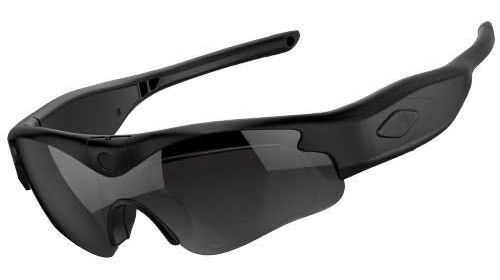
Familiarize yourself with the layout of the sunglasses, noting the location of the camera, buttons, and ports.
This process ensures that you start off on the right foot, ready to explore the sunglasses’ capabilities.
Understanding Key Features
The daVideo Camera Sunglasses are packed with features that make capturing high-quality footage a breeze. Key features include a discreetly placed camera, easy-to-use recording buttons, and connectivity options for file transfers.
The camera is integrated into the sunglasses’ frame, allowing for seamless recording without obstructing your view. This design is perfect for capturing authentic POV footage without distractions.
Recording buttons are strategically placed on the frame, making it easy to start and stop recording. This ensures a hands-free experience, allowing you to focus on the action.
Connectivity options typically include USB ports for charging and file transfers, enabling quick and efficient sharing of your videos. Understanding these features helps you maximize the potential of your sunglasses during any adventure.
Setting Up for First Use
Before hitting the trails or waves, setting up your daVideo Camera Sunglasses is crucial. Here’s how to prepare for your first use:
-
Charge the sunglasses fully using the provided USB cable.
-
Insert any necessary storage, such as a microSD card, into the designated slot.
-
Turn on the device by pressing the power button, usually located on the arm of the sunglasses.
-
Configure initial settings such as date and time, if applicable.
Once setup is complete, you’re ready to start capturing your adventures in stunning POV video. Take a few test recordings to ensure everything is functioning correctly.
Capturing High-Quality Action Footage
Achieving smooth and captivating action footage requires attention to detail. This section will explore optimal camera positioning, setting adjustments, and tips to ensure your videos are as dynamic and engaging as the moments you capture.
Optimal Camera Positioning
Positioning your camera sunglasses correctly is essential for capturing the best footage. The camera should align with your line of sight to ensure a natural perspective.
-
Adjust the fit of the sunglasses for comfort and stability.
-
Make sure the camera is not tilted to avoid skewed horizons.
-
Test the positioning with a few trial recordings to verify alignment.
This ensures the footage is immersive and accurately represents your point of view. Users on platforms like Reddit often discuss the importance of positioning for effective storytelling in POV videos.
Adjusting Settings for Outdoor Recording
Outdoor environments can vary significantly, requiring adjustments to the camera settings for optimal results. Here’s how to tailor your settings:
-
Exposure and Brightness: Adjust based on the lighting conditions, such as bright sunlight or overcast skies.
-
Resolution and Frame Rate: Choose higher resolutions and frame rates for fast-moving scenes to capture more detail.
-
Audio Settings: Ensure the microphone is unobstructed for clear sound.
These adjustments help you adapt to different environments, ensuring high-quality recordings regardless of the conditions. For more detailed insights, check out this YouTube video on optimizing settings for outdoor recording.
Tips for Smooth Video Recording
Smooth video is key to creating engaging POV content. Here are some tips to achieve this:
-
Keep your head movements steady to minimize shake.
-
Use stabilization features if available to reduce motion blurs.
-
Practice different techniques to maintain fluidity in your recordings.
These practices help in reducing camera shake, making your footage more enjoyable to watch. As a result, your action footage will be more professional and captivating to your audience.
Techniques for Stunning POV Videos
Creating stunning POV videos involves more than just recording what you see. This section delves into selecting the right environment, using movement and angles effectively, and enhancing your footage through editing.
Choosing the Right Environment
The environment you choose plays a crucial role in the quality of your POV videos. Opt for locations that offer dynamic and interesting backdrops.
Consider factors like lighting, activity level, and background details. Busy or cluttered environments can be distracting, while serene landscapes might enhance the focus on your activities.
A well-chosen setting complements your footage, adding depth and context. Engaging environments can make your videos more compelling and visually appealing, drawing viewers into your experience.
Incorporating Movement and Angles
Incorporating varied movements and angles can significantly enhance your POV videos. Experiment with different techniques to add interest and dynamism.
-
Try different angles: Capture footage from unique perspectives to create a more immersive experience.
-
Incorporate movement: Use slow pans or quick transitions to convey the excitement of the activity.
-
Vary your speed: Use slow-motion or time-lapse effects to highlight specific moments.
These techniques can transform ordinary footage into captivating video content. For more creative ideas, explore discussions on Reddit.
Enhancing Action Footage with Editing
Editing is a powerful tool to enhance the raw footage captured with your daVideo Camera Sunglasses. Here’s how to make the most of it:
-
Trim unnecessary footage: Focus on the highlights of your recording.
-
Add music or commentary: Enhance the storytelling aspect of your video.
-
Use effects judiciously: Enhance the visuals without overwhelming the core content.
Editing helps refine your footage, making it more engaging and enjoyable for viewers. For more guidance, watch this insightful YouTube tutorial on editing techniques for action videos.
Maintenance and Care Tips
Proper maintenance ensures the longevity of your camera sunglasses and the quality of your recordings. This section offers practical advice on cleaning, battery management, and troubleshooting.
Cleaning Your Camera Sunglasses
Keeping your camera sunglasses clean is essential for clear video quality. Here’s how to maintain them:
-
Use a microfiber cloth to gently wipe the lenses and camera area.
-
Avoid harsh chemicals that can damage coatings or electronic components.
-
Regularly inspect for dust or debris that may affect performance.
Regular cleaning ensures your footage remains clear and free from smudges or obstructions, maintaining professional video quality.
Battery Management for Longer Recording
Effective battery management is key for uninterrupted recording sessions. Follow these tips to extend battery life:
-
Charge fully before use to ensure maximum recording time.
-
Turn off when not in use to conserve power.
-
Carry a portable charger for extended sessions.
Managing your battery effectively ensures you never miss important moments due to power issues. This is especially crucial during long outdoor recording sessions.
Troubleshooting Common Issues
Encountering issues with your daVideo Camera Sunglasses can be frustrating. Here are common problems and solutions:
-
Connectivity issues: Ensure USB cables are securely connected and try re-inserting.
-
Recording problems: Check storage capacity and adjust settings if recordings fail.
-
Power issues: Verify battery charge and inspect power buttons for responsiveness.
Effective troubleshooting helps maintain optimal performance, ensuring a smooth recording experience every time.
Sharing and Monetizing Your Videos
Once your video is ready, sharing and monetizing it can expand your audience and even generate income. This section covers exporting videos, sharing platforms, and monetization tips.
Exporting Your High-Quality Video
Exporting your video in the right format is crucial for maintaining quality. Follow these steps:
-
Choose the correct format: MP4 is widely compatible and retains high quality.
-
Select appropriate resolution: Match the original recording settings for best results.
-
Compress wisely: Balance file size with quality for easier sharing.
Proper exporting ensures your videos are accessible and maintain their quality across different platforms.
Platforms for Video Sharing
Choosing the right platform can help you reach a wider audience. Consider these options:
-
YouTube: A popular choice for video content with monetization options.
-
Vimeo: Offers high-quality playback and a professional community.
-
Social media: Platforms like Instagram or Facebook for quick sharing and engagement.
Each platform offers unique benefits, so choose based on your goals and target audience.
Monetization Tips for Creators
Monetizing your videos can be rewarding. Here are some tips:
-
Enable ads on platforms like YouTube to earn revenue from views.
-
Collaborate with brands for sponsored content opportunities.
-
Sell merchandise or offer exclusive content to subscribers.
These strategies can help turn your passion for video creation into a lucrative venture, providing both creative fulfillment and financial benefits.
daVideo Camera Sunglasses
Smart Glasses vs. Camera Glasses: Which One Is Right for You?
Smart Glasses vs. Camera Glasses: Which One Is Right for You? Smart glasses and camera glasses may look similar at first glance. Both can look like ordinary eyewear. Both can include cameras. Both can allow you to capture photos and video without holding a traditional camera. And both can provide a hands-free way to document the world around you. Click here for the official daVideo Camera Sunglasses But there is an important […]
The Difference Between Smart Glasses and Dedicated Video Recording Glasses
The Difference Between Smart Glasses and Dedicated Video Recording Glasses At first glance, smart glasses and dedicated video recording glasses can look like the same type of product. Both can be worn on your face. Both can contain a built-in camera. Both can provide hands-free video recording. And both can be used to capture a first-person perspective without holding a traditional camera. But there is an important difference between them. Click here […]
Meta Glasses or daVideo? Choosing the Right Glasses for POV Video
Meta Glasses or daVideo? Choosing the Right Glasses for POV Video If you’re looking for a way to record hands-free, first-person video, you’ve probably come across two very different types of camera glasses: Meta smart glasses and dedicated daVideo camera sunglasses. Both can give you a wearable way to capture video. But they’re designed with different priorities in mind. Meta glasses are built as multifunction smart glasses that combine a camera with […]
UV400 Protection and Video Recording: What to Look for in Camera Sunglasses
UV400 Protection and Video Recording: What to Look for in Camera Sunglasses When people shop for video camera sunglasses, they often focus on camera specifications. How many megapixels does the camera have? What resolution does it record? How wide is the field of view? How much storage does it support? How long does the battery last? Those are all important questions. But there is another feature that should be near the top […]
Why Vibration Recording Alerts Matter When You’re Wearing Camera Glasses
Why Vibration Recording Alerts Matter When You’re Wearing Camera Glasses When you’re using a traditional camera, it’s usually easy to see what’s happening. You can look at the screen. You can see the recording indicator. You can hear a confirmation sound. But camera glasses are different. When you’re wearing a camera on your face, you can’t necessarily see the camera itself while you’re using it. You may not have a screen directly […]
daVideo vs. Meta Glasses: 15 Reasons to Consider Dedicated Video Camera Sunglasses
daVideo vs. Meta Glasses: 15 Reasons to Consider Dedicated Video Camera Sunglasses If you’re shopping for camera glasses, you’ve probably come across Meta glasses. They’re one of the best-known smart-glasses products on the market, combining a camera with features such as audio, smartphone connectivity, voice interaction, and other smart capabilities. But there’s another category worth considering: dedicated video camera sunglasses. Instead of trying to turn glasses into an all-purpose smart device, dedicated […]
Why Dedicated Camera Glasses Make Sense for Action Sports
Why Dedicated Camera Glasses Make Sense for Action Sports Action sports are all about movement. Whether you’re riding a mountain bike, skiing down a slope, skateboarding, snowboarding, kayaking, fishing, hiking, motocross riding or simply trying something new, the experience happens quickly. That creates a challenge for anyone who wants to record it. You can’t always hold a camera. You don’t always have time to set up a tripod. And you don’t necessarily […]
Why Physical Recording Controls Can Beat Voice Commands
Why Physical Recording Controls Can Beat Voice Commands Voice commands have become one of the most recognizable features of modern smart glasses. Being able to tell your glasses to take a picture, start recording or perform another function can feel futuristic. For many situations, voice control is genuinely useful. But when your primary goal is recording video, voice commands aren’t always the best way to control a camera. Sometimes, a simple physical […]
The Best Camera Glasses for Motorcycle Riders: What Should You Look For?
The Best Camera Glasses for Motorcycle Riders: What Should You Look For? Motorcycle riding is one of those activities that is incredibly difficult to capture from your own perspective. You can mount a camera to your motorcycle. You can attach an action camera to your helmet. You can have another rider follow you with a camera. But there is something different about recording exactly what you see while you’re riding. That’s where […]
Why Adjustable Camera Angles Matter in POV Camera Glasses
Why Adjustable Camera Angles Matter in POV Camera Glasses When people shop for POV camera glasses, they often focus on resolution. 1080p. 4K. Frame rate. Megapixels. Storage. Battery life. All of those specifications matter. But there’s another feature that can have a surprisingly big impact on your finished video: The angle of the camera. A camera can have excellent resolution, but if it’s pointed too high, too low or in the wrong […]
Why 128GB of Removable Storage Matters in Video Camera Sunglasses
Why 128GB of Removable Storage Matters in Video Camera Sunglasses When shopping for video camera sunglasses, it’s easy to focus on camera resolution. 1080p. 4K. Frame rates. Wide-angle lenses. Image stabilization. But there’s another specification that can be just as important: Storage. After all, what good is a camera that records great video if you quickly run out of space? For people who plan to record a lot of POV video, travel […]
Camera Glasses Without the AI: Why Simpler Can Be Better
Camera Glasses Without the AI: Why Simpler Can Be Better Smart glasses have become increasingly sophisticated. Some can answer questions, interact with your phone, provide voice assistance, take photos, record video, play audio, make calls and offer AI-powered features. That’s impressive technology. But there’s another question worth asking: Do you actually need all of those features if your main goal is recording video? For many people, the answer may be no. If […]
Leave A Comment